Easy2Boot, also known as E2B, is a completely free utility for Windows that you can use to create versatile multiboot USB flash drives and hard drives. While other tools require you to format your drive every time you want to set up a bootable drive, this allows you to store multiple different OS installers and even live Linux environments on a single drive.
Once you have prepared the USB drive with the initial setup, you can add a new operating system by simply dragging and dropping ISO files into the correct folder via Windows Explorer. That makes it very simple. Setting up multiboot USBs and hard drives without repeatedly formatting is the main differentiator between this and similar utility tools.
It doesn't just rely on one bootloader; it integrates three different menu systems (grub4dos, agFM, and Ventoy) to guarantee compatibility with almost any machine you encounter. Whether you are trying to boot a 15-year-old laptop relying on Legacy BIOS or a modern Windows 11 machine locked down with strict UEFI Secure Boot, Easy2Boot can handle it.
Drag-and-drop payload management
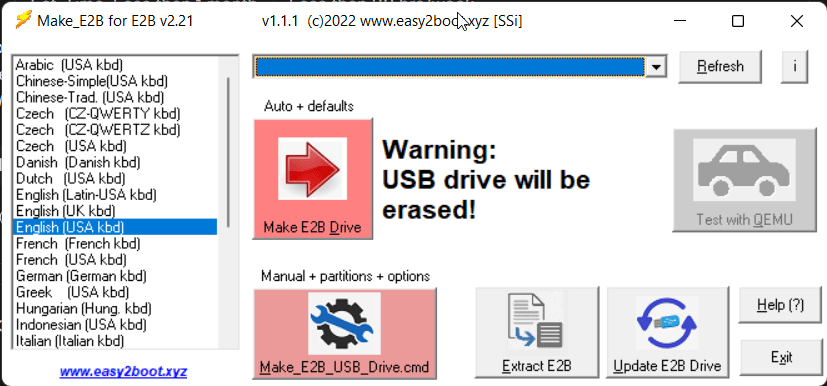
For system administrators, IT professionals, and even casual users, the core appeal of Easy2Boot is its file management system. Once you run the initial setup executable on Windows to prepare your USB drive, you may never need to use a flashing tool again. You simply copy your standard .ISO, .WIM, .VHD, or .IMG files directly onto the USB drive. The software dynamically generates the boot menu on the fly every time you plug it into a computer.Tri-menu boot system (Legacy & UEFI)
Where most tools struggle is raw boot compatibility. That is exactly where E2B flexes its muscles. It utilizes grub4dos for highly reliable Legacy BIOS booting (great for older Windows versions and DOS tools). For modern systems, it integrates agFM (a grub2 file manager) for direct UEFI booting and Secure Boot bypass, while also including a modified version of Ventoy for handling specific ISOs and Windows PE environments. This redundancy ensures almost 100% boot success across different hardware generations.Automated Windows installations
One of the great features I noticed was unattended Windows installations. For IT professionals and system admins setting up multiple machines at scale, this is a highly useful feature. You can simply place XML configuration files alongside your Windows ISOs, allowing the tool to automatically select the Windows edition, accept licensing terms, partition drives, and create user accounts without any manual input during the boot process.Advanced partition image switching
While Windows is easily manageable in terms of booting, some complex Linux setups and alternative operating systems may not be. Easy2Boot also takes care of this by using proprietary .imgPTN files, which can swap out the partitions on the USB drive to make the host computer think it is booting from a dedicated, single-OS flash drive.King of multiboot USB tools
Easy2Boot is the undisputed king of multiboot USB tools if you prioritize maximum compatibility and feature depth over visual simplicity. It is a must-have for IT technicians, helpdesk workers, and enthusiasts. It is, however, overkill for beginners or casual users.